
Self-custody. Multichain. Desktop-first.
Take the leap
into web3.
Leap is a self-custody multichain wallet built for modern crypto use. Manage assets across Cosmos, Bitcoin, Ethereum, Solana, Sui and more, with built-in staking, cross-chain swaps and a cleaner desktop experience.












Built for the multichain era
One desktop wallet
for the chains and actions that matter.
Leap is a self-custody multichain wallet built for people who move across ecosystems, not just within one chain. Manage assets, connect to dApps, stake tokens and complete cross-chain swaps from one desktop app designed to keep your workflow fast, clear and under your control.
Leap brings supported networks into one place, so you can manage accounts, balances and activity across ecosystems without switching wallets, browser extensions or recovery phrases.
Cosmos Hub
Osmosis
Celestia
Injective
Bitcoin
Ethereum
Solana
Sui
NEAR
Avalanche
Polygon
 BNB Chain
 TON
TON
 Tron
Tron
 XRP
XRP
Your wallet is yours to manage. Leap is built around local control, giving you a more secure way to store assets, review permissions and use crypto without handing custody to a third party.
Leap keeps staking inside the wallet experience, so you can delegate, monitor rewards and manage validator positions without breaking your workflow or relying on separate tools.
Compare routes, review outputs and move between ecosystems inside a single interface. Leap keeps swaps connected to your wallet flow instead of sending you through extra apps or exchange accounts.
Portfolio
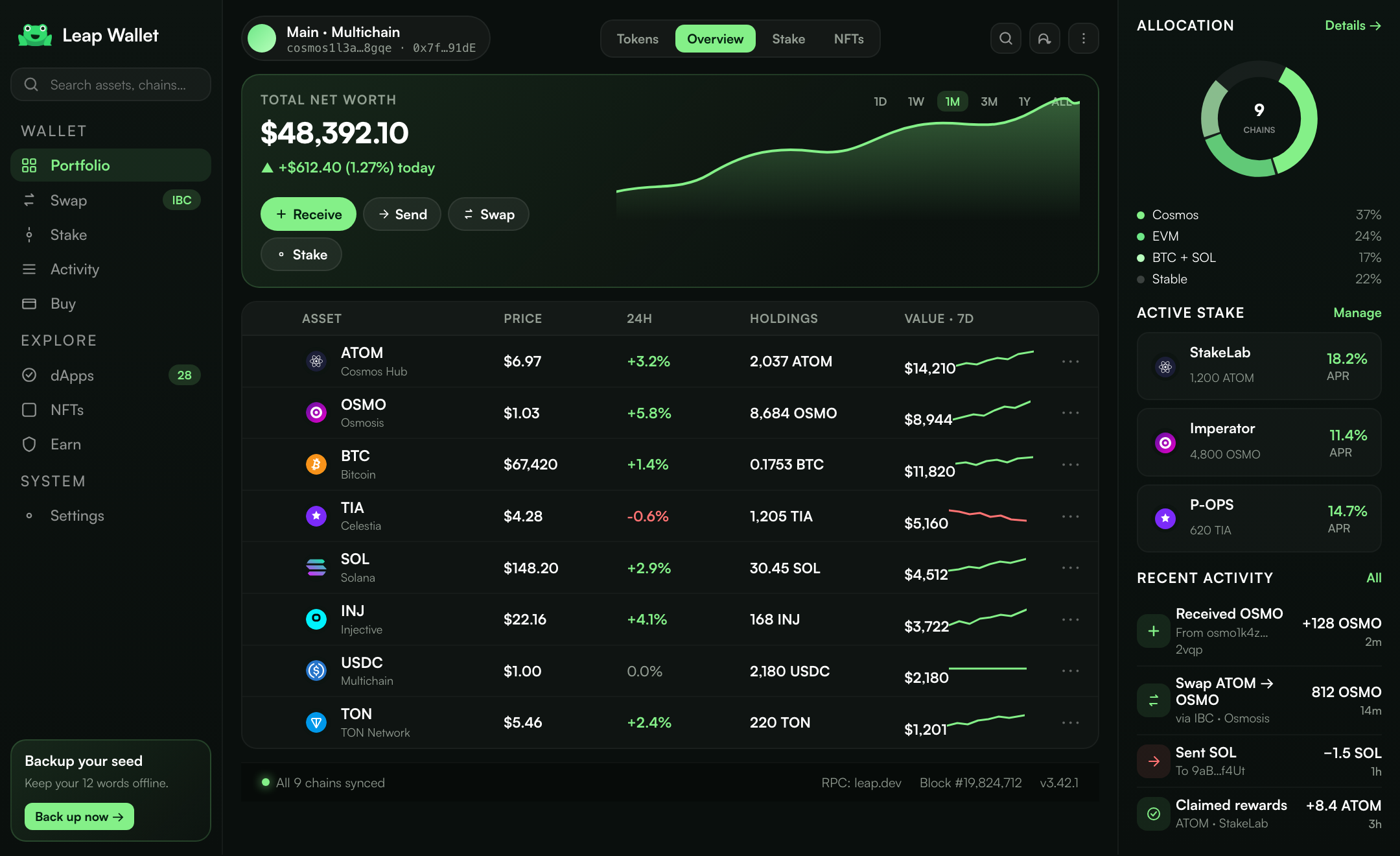
See your full multichain
portfolio in one place.
Leap brings your balances, staked assets, liquid staking positions and on-chain activity together in one clean desktop view. Track what you hold across networks, follow price movement and keep portfolio context close to every wallet action.
- Manage assets across multiple chains from one portfolio view.
- Track staked balances, liquid staking positions and rewards in real time.
- Review transaction history by chain, asset and wallet activity.
Multichain
Move across ecosystems
without changing wallets.
Leap gives you one desktop wallet for the networks you use most, from Cosmos and Ethereum to Bitcoin, Solana, Sui and NEAR. Add chains, manage addresses, connect to dApps and move assets between ecosystems without breaking your flow.
- Use Cosmos, EVM, Bitcoin, Solana, Sui and NEAR from one wallet.
- Add supported chains, custom networks and tokens when you need them.
- Keep accounts, addresses and dApp connections organized in one place.







In-wallet swap
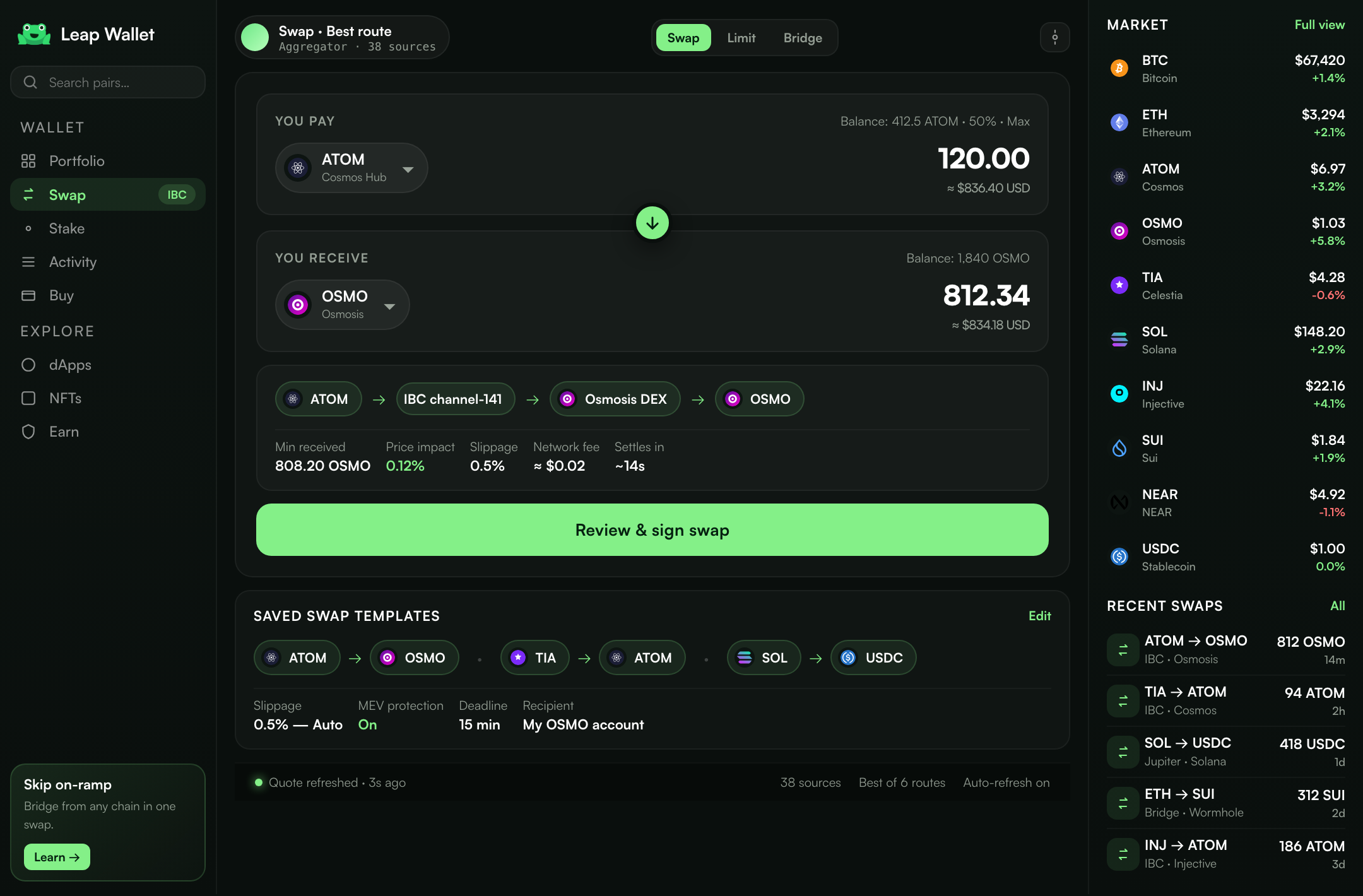
Swap assets across chains
without leaving Leap.
Leap brings cross-chain swaps into the wallet flow, so you can move between assets and ecosystems from one screen. Compare routes, review expected output and sign transactions directly from your self-custody desktop wallet.
- Swap between supported assets without opening another app.
- Review routes, network fees and expected output before you sign.
- Settle funds directly into your wallet, not an exchange account.
Add Funds
Fund your wallet with payment
methods you already trust.
Leap brings crypto on-ramps into the same desktop flow as the rest of your wallet. Buy supported assets with card, Apple Pay, Google Pay or bank transfer, then use them for swaps, staking, dApps and everyday multichain activity.
Buy crypto
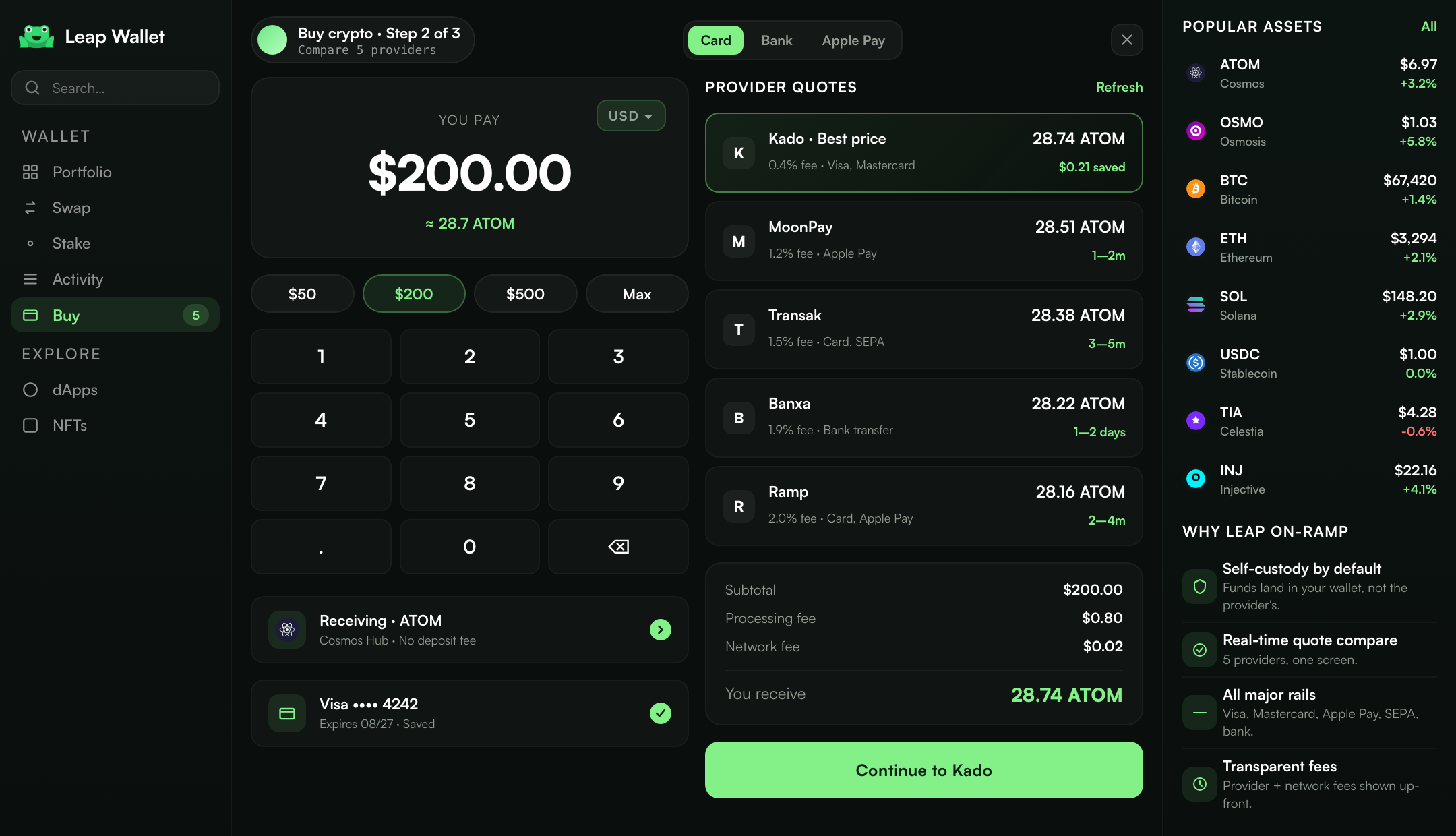
Buy crypto directly
into your self-custody wallet.
Leap brings supported on-ramp providers into one wallet flow, so you can compare payment options, review fees and see where your crypto lands before you confirm. No exchange detour, no extra wallet setup.
- Compare available providers, payment methods and quoted rates.
- Review fees, destination details and expected delivery before buying.
- Receive supported assets directly in your Leap wallet.
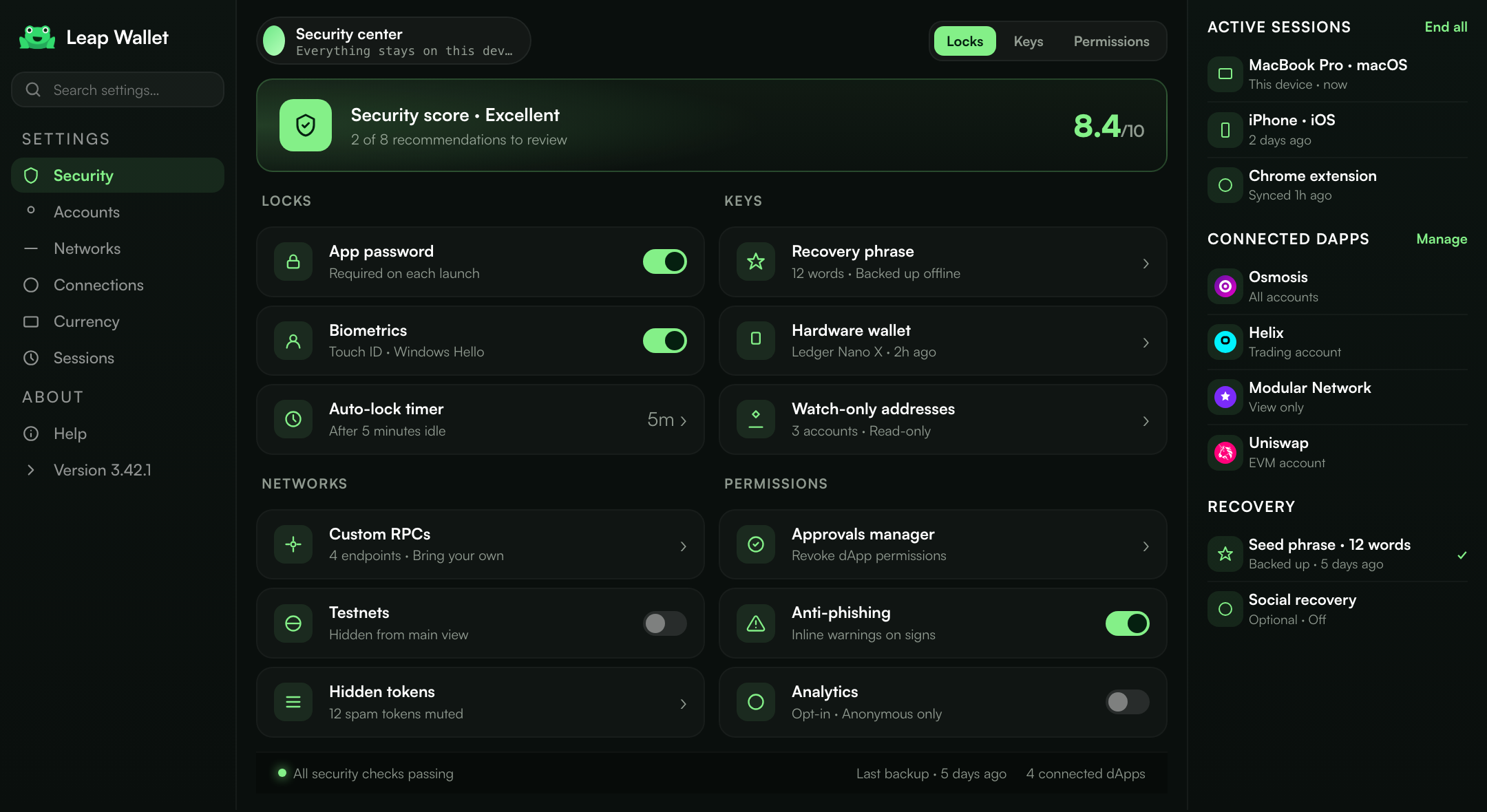
Security
Self-custody security
for every wallet action.
Leap is built around local control, clear transaction review and safer dApp connections. Your wallet activity stays visible before you sign, while keys, permissions and connected accounts remain under your control.
Leap does not take custody of your funds. Wallet actions are confirmed by you before anything is signed.
Recovery phrase and account access are managed locally, so ownership stays tied to your wallet, not a third-party account.
Review network, asset, amount, fees and destination details before confirming wallet actions.
Connect a hardware wallet for an added layer of protection when managing larger balances or long-term holdings.
Keep track of connected apps, permissions and approvals before giving access to your wallet.
Manage wallet settings, network access and activity preferences with a self-custody-first approach.
Self-custody
Your keys, permissions
and wallet settings stay with you.
Leap keeps ownership and control close to the user. Manage recovery, connected apps, approvals and account settings from one wallet experience, so self-custody stays practical after setup.
- Keep recovery and account access under your control.
- Review connected dApps, permissions and wallet approvals.
- Use hardware wallet support for stronger long-term protection.
Download
Get Leap on desktop and start
using every chain faster.
Install Leap for macOS, Windows or Linux and keep your multichain wallet in a dedicated desktop app. Access portfolio tracking, swaps, staking, dApp connections and self-custody controls without relying on a browser extension.
Download Leap Wallet for desktop
Choose your platform and install the latest desktop build. Each release is prepared for a smoother multichain workflow across supported networks.
Latest desktop update.
-
NEW
Sui Move accounts Native send, receive and dApp connection support for Sui accounts.
-
FAST
Faster wallet actions Portfolio refresh is 28% faster across accounts with 50+ assets.
-
SAFE
Clearer signing flows Signing review now loads approval details up to 35% faster.
-
FIX
Desktop polish Cold start improved by 420 ms on Apple Silicon and Windows x64.
Leap Wallet FAQ
Answers to common questions about Leap Wallet, self-custody, supported chains, swaps, staking and desktop setup.
Leap Wallet is a self-custody multichain crypto wallet for desktop. It lets you manage assets across Cosmos, Ethereum, Bitcoin, Solana, Sui, NEAR and more, with portfolio tracking, cross-chain swaps, staking, funding and dApp connections in one app.
Leap gives your wallet a dedicated desktop workspace instead of keeping every action inside a browser tab. You can review your portfolio, swap assets, stake, connect to dApps and manage self-custody settings from one focused app.
Leap supports major Cosmos networks, EVM chains, Bitcoin, Solana, Sui, NEAR and other supported ecosystems. You can manage assets across these networks, add supported chains and organize custom tokens from the same wallet.
Choose the assets you want to swap, review the route, expected output and network fees, then confirm from your wallet. Supported swaps settle back into your self-custody wallet without requiring a separate exchange account.
No. Leap is non-custodial. Your recovery phrase and wallet access stay under your control, and wallet actions are reviewed and confirmed by you before anything is signed.
Yes. Leap supports staking workflows for supported proof-of-stake networks. You can delegate assets, track rewards, manage validator positions and follow liquid staking positions from the same portfolio experience.
No account is required to create or import a self-custody wallet. Buying crypto with card, Apple Pay, Google Pay or bank transfer may require verification from the selected payment provider, but that is separate from using the wallet itself.
Yes. Leap is designed as a desktop wallet for macOS, Windows and Linux. Choose the build for your operating system and use the same self-custody wallet workflow across supported networks.
Your recovery phrase is the key to your self-custody wallet. If it is lost, the assets controlled by that wallet may not be recoverable, so it should be stored offline and protected from screenshots, cloud backups and shared devices.
Using a separate wallet for every chain creates more places to manage balances, permissions and recovery. Leap brings supported networks, dApp connections, swaps, staking and portfolio tracking into one consistent desktop wallet.